• Use the Bias Importer Tool I made!
OR
• Manual Procedure:
1.
You will receive a folder with a weird name. This is the AMP model, simply paste it inside the GlobalPresets folder.2.
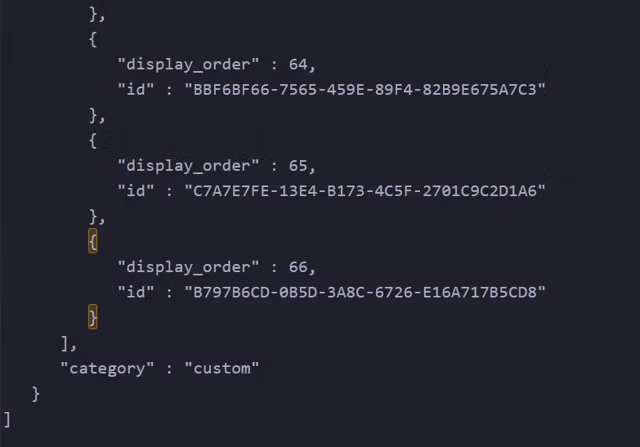
Inside the Bias folder you will find a file called “cate.idx”. Open it with a Text Editor and scroll at the bottom of it.You need to append a certain piece of code at the end of the file.
You append the code between the brackets highlighted in the picture above.
“display_order” : X, where X is the previous value +1.
“id” : “unique identifier”, where the unique identifier must match the name of the Bias Amp folder name you just purchased.
If you are having trouble contact me!
Default Path for GlobalPresets folder:
• (On Windows) “C:\Users\User Name\Documents\Bias\GlobalPresets\”
• (On Mac) “documents / bias / global presets” .
Each amp is a folder with a unique identifier as its name. Inside the Bias folder go to GlobalPresets:
Simply paste the folder with that weird name in the pool with all the other folders inside GlobalPresets:
Note: A separate IR file is provided in case Bias Amp fails to upsample/downsample. In that case re-import the IR or use an external IR loader like NadIR.